
Plant Inspector
Construction site background
Built for 5–50 person construction companies

One simple system for your sites, machines and crews.

Plant Inspector keeps field operations tidy and auditable: projects, inspections, documents, photos and timesheets in one place — plus an optional Office CRM.

  • • Clear roles: admin, manager, operator
  • • Inspections with checklists, photos & issues
  • • Certificates with expiry alerts
  • • Project dashboards with docs, photos, orders & timesheets
  • • Separate Office CRM app for sales & admin teams

Typical rollout: 1–2 days. No long-term contracts.

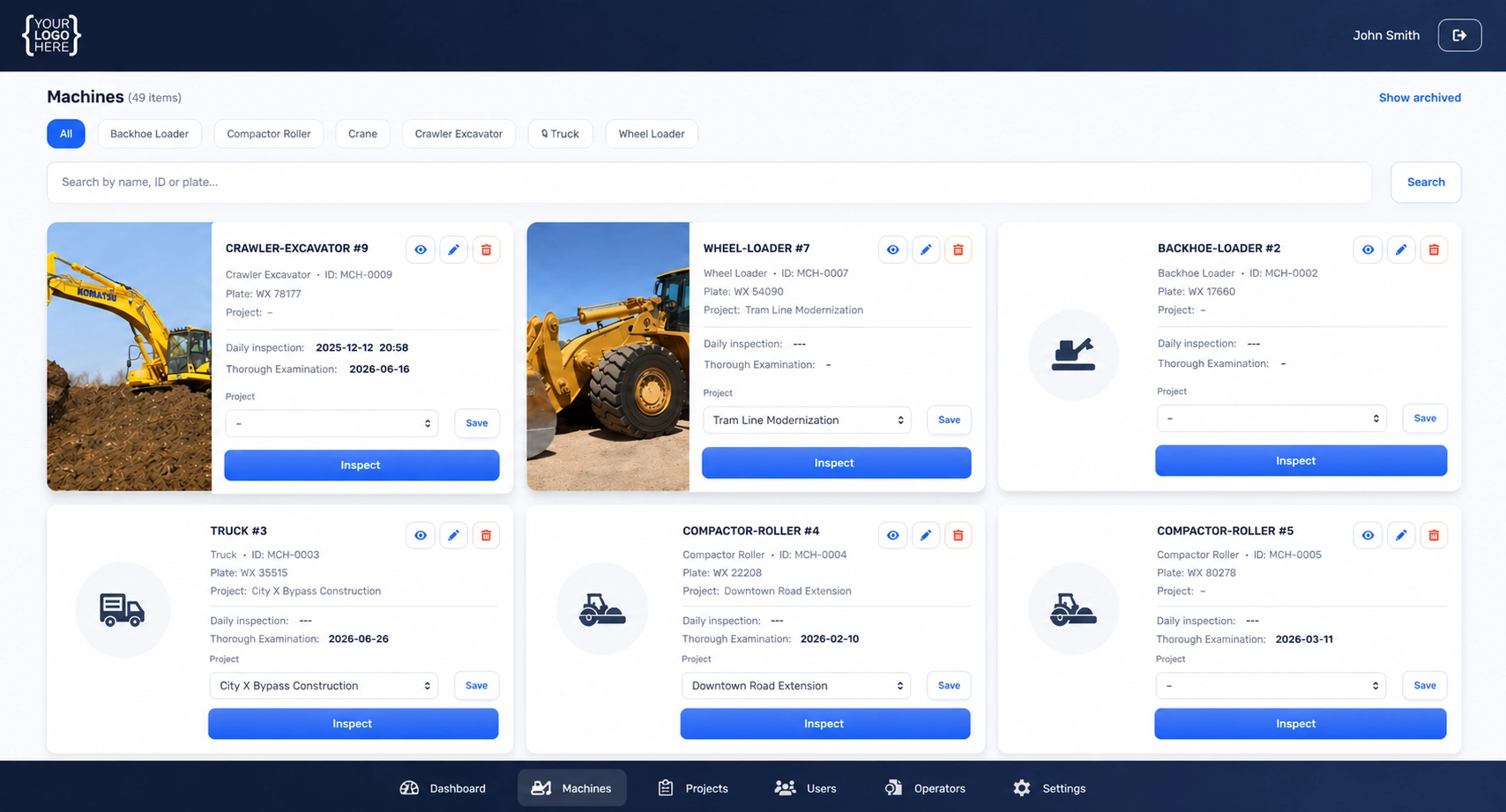
Machine dashboard
admin view
Plant Inspector project dashboard screenshot
LESS PAPERWORK
–30% Average reduction in manual admin across projects.
FASTER GO-LIVE
1–2 days From first login to real work on a live site.
CREW ADOPTION
90%+ Supervisors and operators actually keep using it.

Everything your sites need. Nothing they don’t.

Plant Inspector is the field layer: what happens on site, around machines and crews. Your office team can use the separate Plant Inspector CRM app to handle sales and client work.

📁
Project dashboards

One screen for machines, photos, documents, orders, timesheets and notes.

🛠️
Machine inspections

Checklists, issues, comments and photos – with overdue & due-soon views.

👷
Certificates & training

Employee records with certificate PDFs and upcoming expiries.

⏱️
Timesheets & overtime

Weekly hours per project and worker, plus overtime summary.

Simple, safe permissions

  • Admin

    Full control of users, roles and system settings.

  • Manager

    Manages projects, timesheets, orders, documents and inspections.

  • Operator

    Only what they need on site: checklists, photos, notes – nothing extra.

Designed so that even non-technical supervisors can use it after one short session.

A quick look inside Plant Inspector

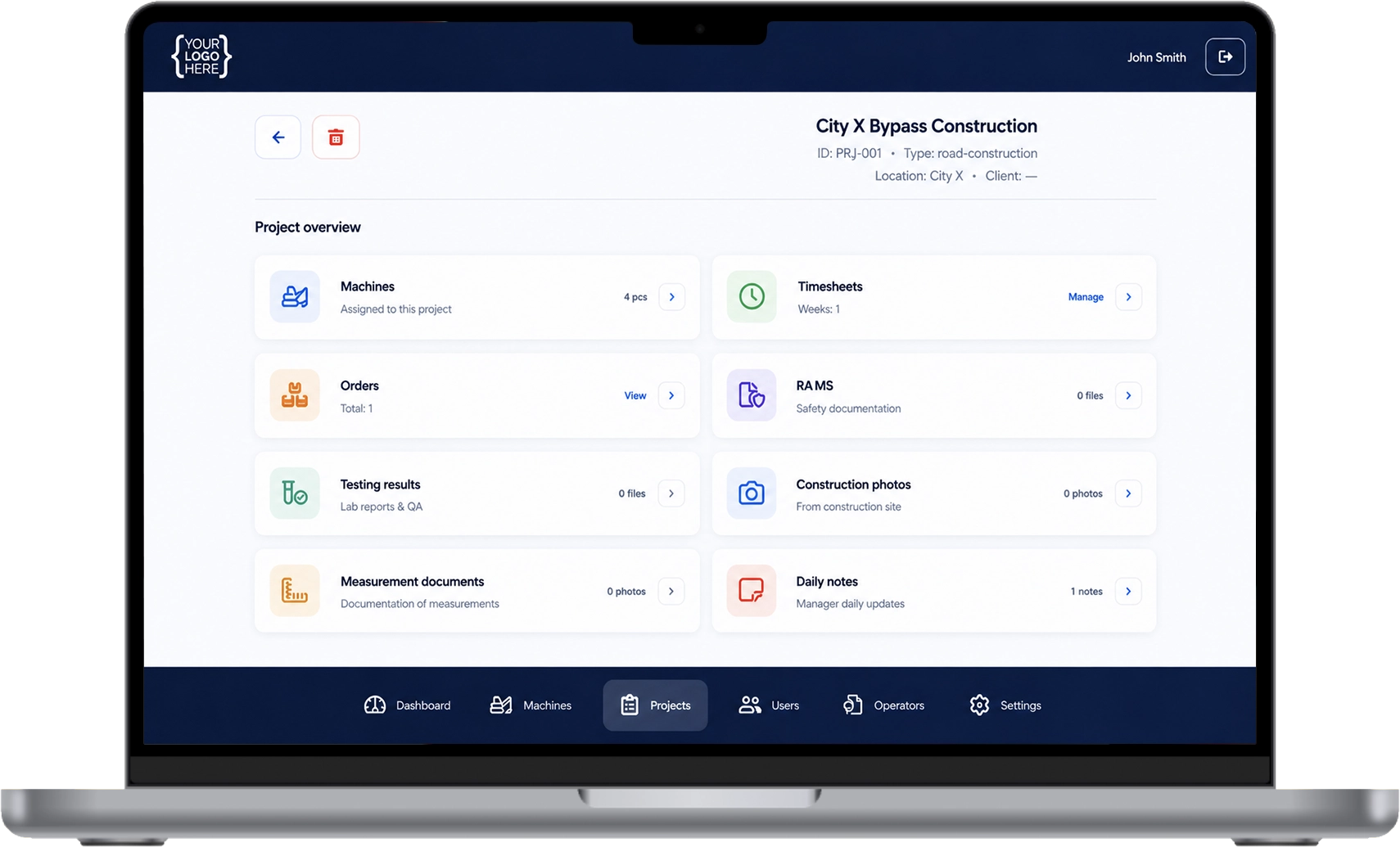
Project dashboard screenshot
Project dashboard
desktop / wide
One command center for projects: machines, status, alerts and quick access to docs, photos, orders and timesheets.
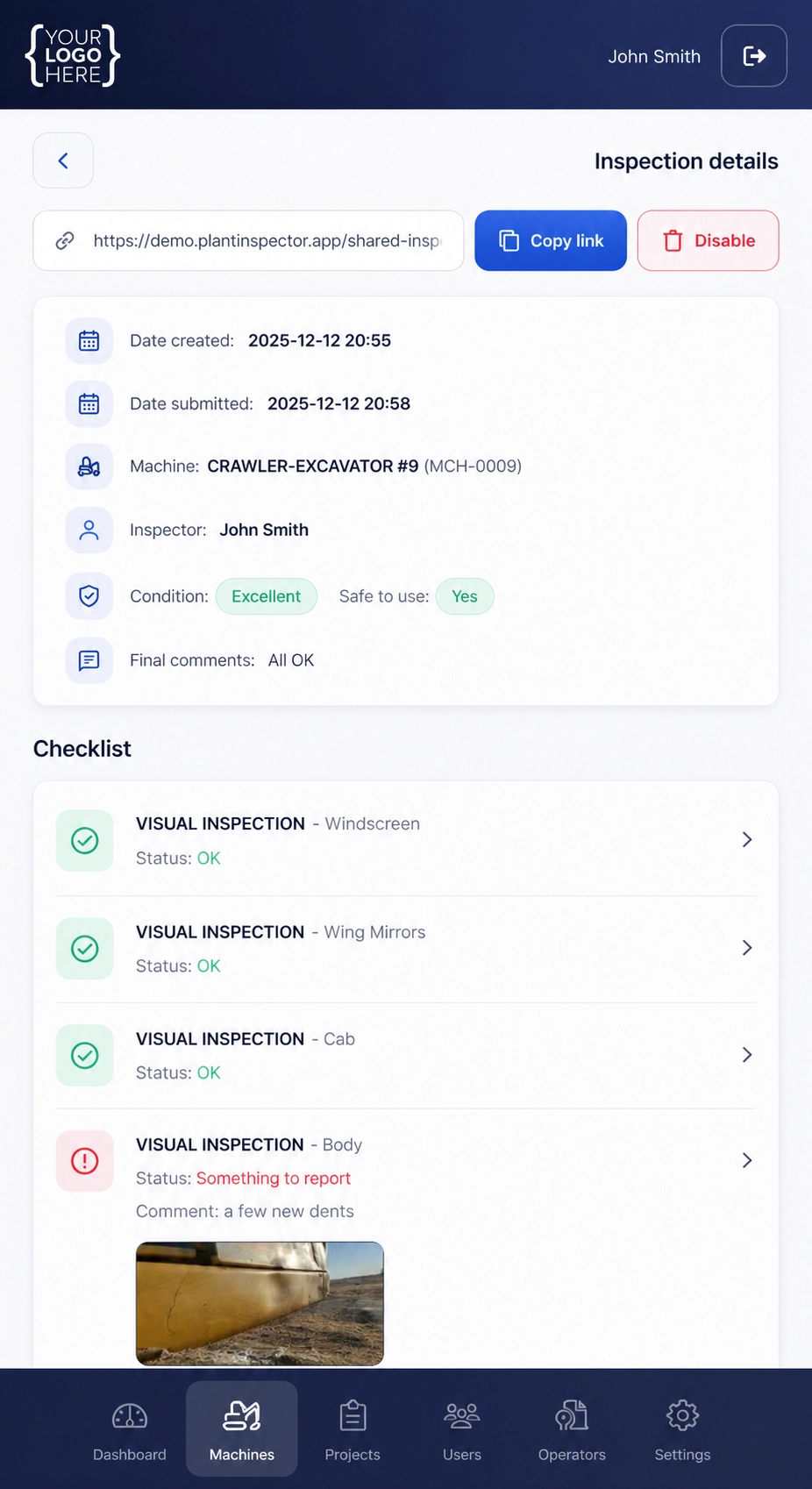
Machine inspection mobile view screenshot
Inspection checklist
mobile / tall
Step-by-step flow with photos and notes. Large tap targets designed for muddy job sites.
Project list screenshot
Project list
overview
Clean list view with just the information needed to decide where to tap next — fast and readable.
Project details screenshot
Crew-friendly UI
field-first
Designed so operators feel comfortable on day one — minimal clutter, clear actions and status.
Crew screenshot
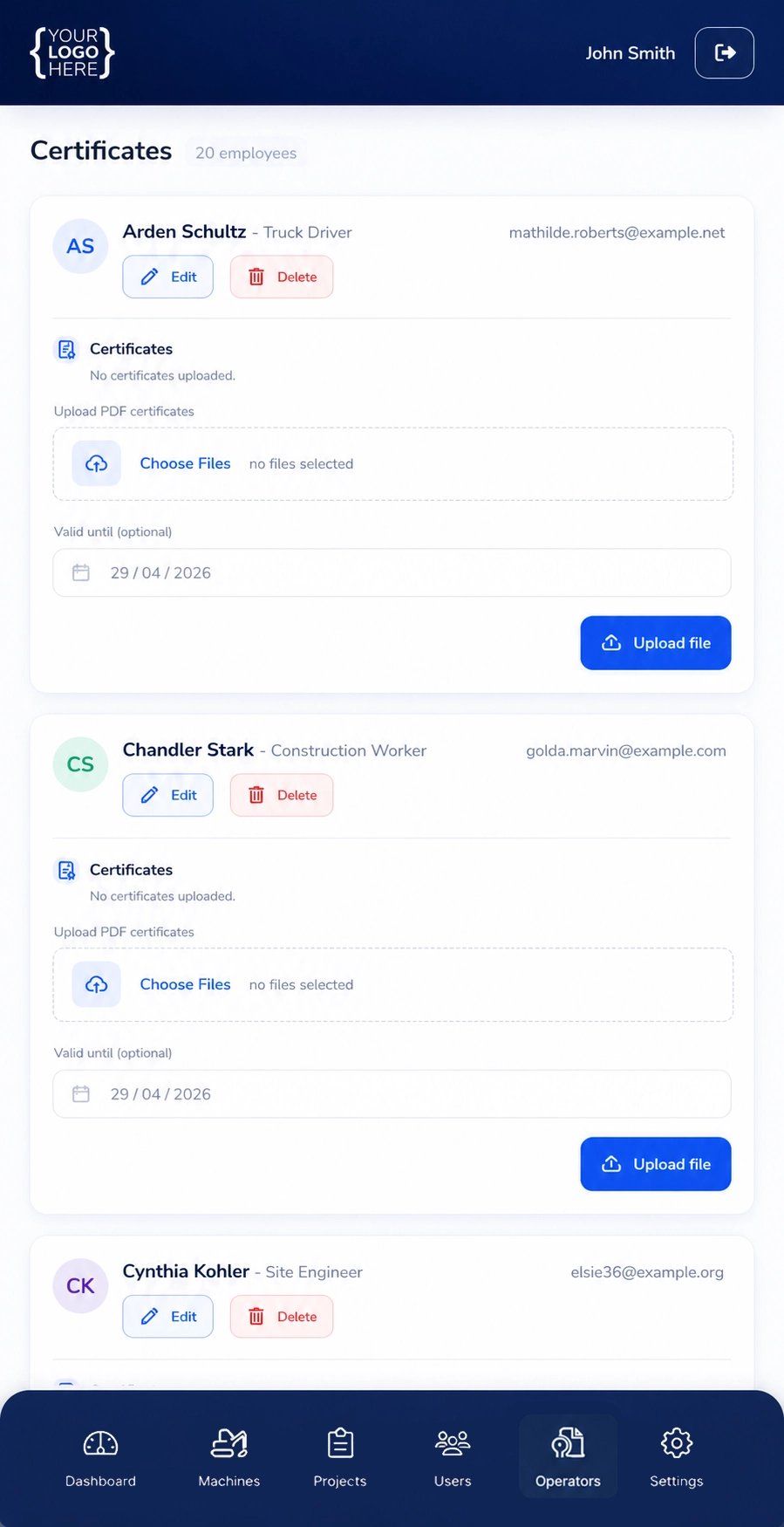
Employees & certificates
compliance
Certificates, authorizations and expiry dates in one place, with proactive “due soon” visibility.
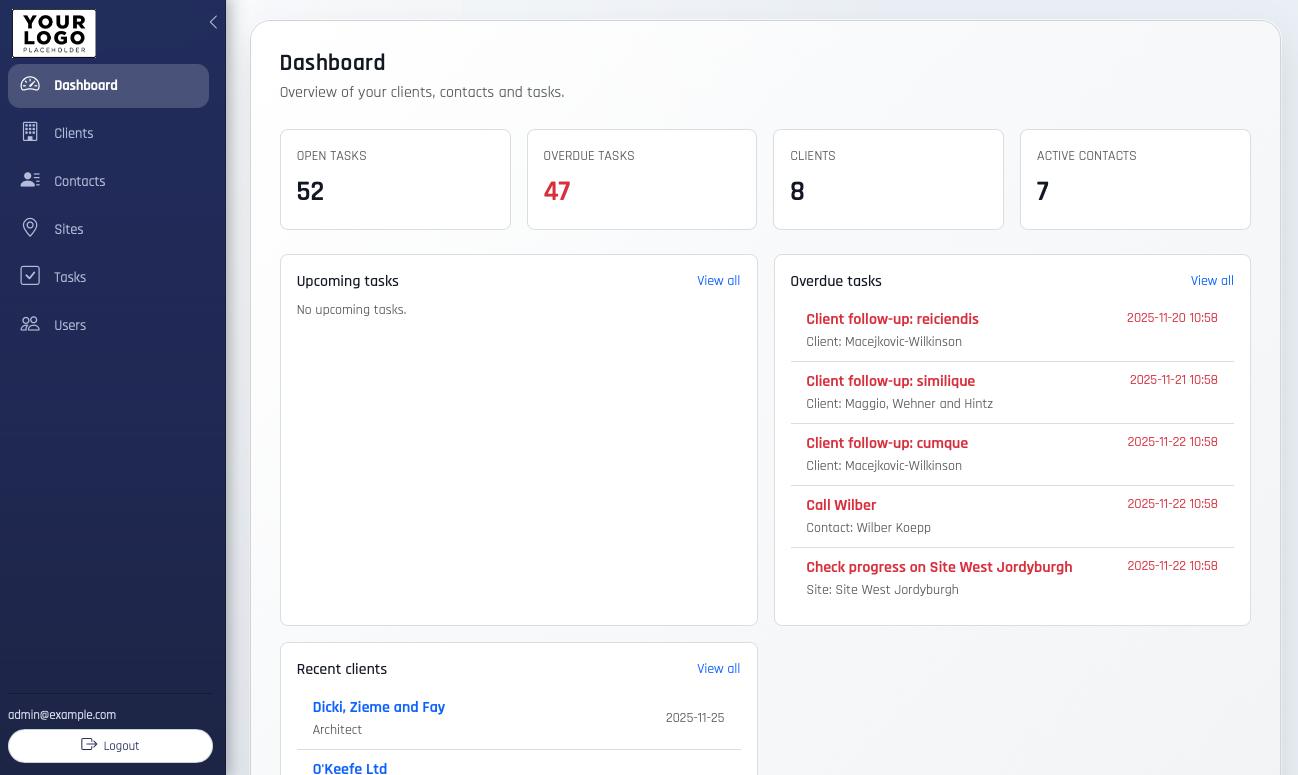
Plant Inspector Office CRM screenshot
Office CRM
back office
Fast search + filters, task list and customer history — designed for keyboard & mouse work.
Tip: If you add new screenshots later, you can adjust the frame ratio via style="--ar: 4/3". The image will still be centered and preserved (no ugly cropping).
Open interactive demo →

Plant Inspector Office CRM – a separate app for your back office

Plant Inspector CRM is a dedicated web app for office staff. It’s not another tab for operators – it’s where your sales and admin teams work.

  • • Customers, contacts, addresses and sites
  • • Tasks like call-backs, quotes and meetings
  • • Notes and history linked to projects
  • • Browser-based, optimized for office use (keyboard + mouse)
Field work in the Plant Inspector Ops app. Office work in the Plant Inspector CRM app. Same company data, two focused tools.

Office CRM app back office only
Plant Inspector Office CRM screenshot
  • • Clear customer list with search & filters
  • • Task list for office staff – separate from field checklists
  • • Designed for working with a mouse and keyboard, not on a muddy jobsite

Simple pricing, no long-term lock-in

Field operations

Plant Inspector Ops

The core app for projects, machines, inspections, documents, photos and timesheets.

starting €49 per month, based on your size
  • • All field modules included
  • • Unlimited projects
  • • Admin, manager & operator roles
  • • Email support & regular updates
  • • One fixed amount for the entire company, not per user
Talk to us about pricing
Office add-on

Plant Inspector Office CRM

Separate CRM web app for your office team – tightly connected to your projects.

  • • Customers, contacts, addresses
  • • Tasks & follow-ups for sales/admin staff

Share how your office works today – we’ll prepare a combined offer for Ops + CRM.

FAQ

I'm missing some functionalities, what then?

We can easily and cheaply add functionalities tailored to your needs

Does it work on phones?

Yes. Plant Inspector Ops is designed for phones and tablets. Operators can complete checklists, add photos and notes directly from the field.

Who uses the Office CRM app?

Office staff, sales and admin teams. It’s a browser-based CRM for the office, separate from the Plant Inspector Ops app used by managers and operators on site.

How much training do we need?

Managers are usually comfortable within 1–2 days. Operators learn during a short on-site walkthrough because the flows are step-by-step. Office staff will find the CRM layout familiar to other web tools.

Can we export our data?

Yes. We can provide exports (e.g. Excel/CSV) for timesheets, projects, customers and other key data, and build custom reports if needed.

How secure is Plant Inspector?

Plant Inspector is built on modern, battle-tested technologies with role-based access, and regular backups. Self-hosted deployments on your own infrastructure are also possible.

Ready to see Plant Inspector on your projects and in your office?

We’ll only use your details to contact you about Plant Inspector. No spam, ever.

We use cookies for analytics (Google Analytics) to improve this website. You can accept or reject analytics cookies. You can change your choice anytime.